If you have logged into your WordPress dashboard recently and seen a red warning about PHP 7.4 being outdated, you are not alone. It is one of the most common issues we see when businesses come to us for help with an existing website.
The warning is not something to ignore. It is telling you that the technology powering your website no longer receives security updates, and that puts your site and your visitors at risk.
The short answer: PHP 7.4 stopped getting security updates in November 2022. WordPress 7.0 (released May 2026) still runs on it, but only just: 7.4 is now the oldest version WordPress supports, and it is next in line to be dropped. WordPress recommends PHP 8.3.
What is PHP and why does it matter?
PHP is the programming language that powers WordPress. Every time someone visits your website, PHP runs behind the scenes to load your pages, process forms, display content and connect to your database. It is the engine room of your site.
Like any software, PHP gets regular updates. These updates include security patches, performance improvements and new features. When a version of PHP reaches end of life, the PHP team stops releasing these updates entirely.
PHP 7.4 reached end of life on 28 November 2022. That means no security patches, no bug fixes and no updates of any kind for almost four years now.
When will WordPress stop supporting PHP 7.4?
WordPress 7.0 came out on 20 May 2026 and raised its minimum PHP version to 7.4, dropping PHP 7.2 and 7.3. Sites still on those versions stay on WordPress 6.9 and no longer get major updates.
PHP 7.4 is now at the bottom of the list. WordPress retires a PHP version once very few sites still use it, and no date has been announced for 7.4 yet, but it will be the next one to go. When that happens, sites on PHP 7.4 will be stuck on an old version of WordPress, missing new features and, more importantly, future security fixes.
What does the warning in my dashboard mean?
There are two warnings we see most often. WordPress itself says your site “is running on an outdated version of PHP (7.4.33), which does not receive security updates and soon will not be supported by WordPress”. If you use themes from ThemeForest, the Envato Market plugin also warns that support for PHP versions below 8.2 is being removed.
Both mean the same thing: the server your website runs on needs a newer version of PHP, and your theme and plugins need to be checked so they keep working once it is updated. Neither is a fault on your side, and neither will fix itself.
Which PHP version should you move to?
Aim for PHP 8.3, which is what WordPress recommends. Skip PHP 8.1: its security support already ended in December 2025. PHP 8.2 is only a short-term fix too, because its security support ends in December 2026.
Most well-built WordPress sites run on 8.3 without trouble once plugins are up to date. Older sites, or ones with custom code or abandoned plugins, usually need some fixes first, which is why we always check before switching. You can see how we do it on our PHP upgrade page.
What are the risks?
Running your website on an unsupported version of PHP introduces several serious risks that get worse over time.
Security vulnerabilities
Without security patches, any known vulnerabilities in PHP 7.4 remain permanently open. Attackers actively target websites running outdated software because they know these exploits will never be fixed. This can lead to malware infections, data breaches and your site being blacklisted by Google.
Plugin and theme incompatibility
WordPress plugins and themes are increasingly dropping support for PHP 7.4. This means you may not be able to update critical plugins, leaving you stuck on older versions with their own security issues. It is a compounding problem.
Poor performance
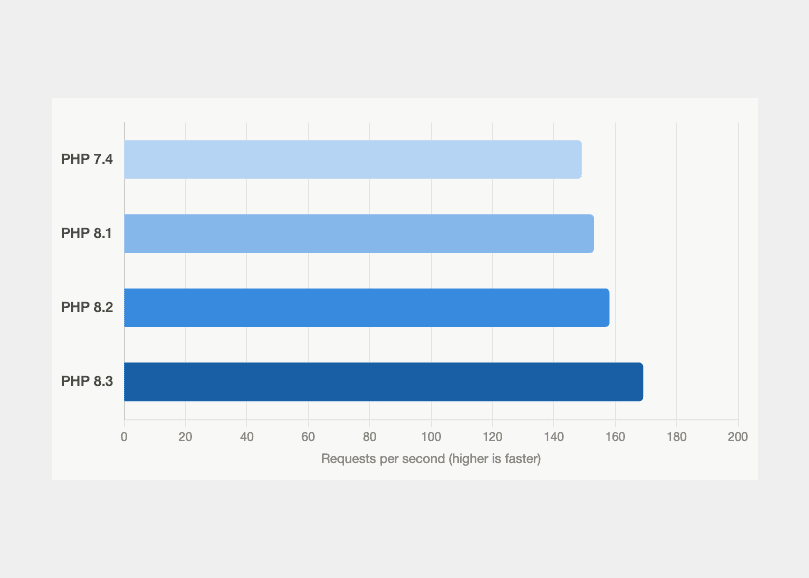
PHP 8.x is significantly faster than PHP 7.4. Benchmark tests consistently show improvements of 20-40% in execution speed. This directly affects your page load times, user experience and search engine rankings.
Can you just update PHP?
This is the question we get asked most often, and the answer is: it depends.
If your website was built several years ago on PHP 7.4, there is a good chance that your theme, plugins or custom code are not compatible with newer versions of PHP. Simply updating PHP on the server without checking compatibility first can break your entire website.
The safe approach is to audit your site first. We review your theme, plugins and any custom code to identify what will break, then either fix the compatibility issues or recommend a rebuild if the site has too much technical debt.
Your two options
Option A: PHP compatibility update. If your site is relatively modern and well built, we may be able to update PHP, fix compatibility issues and get everything running on a supported version without a full rebuild. This is typically the faster and more cost-effective option.
Option B: Full website rebuild. If your site is several years old, built on an outdated theme or page builder, or has accumulated significant technical debt, a rebuild is the smarter long-term investment. Our website refresh is built for exactly this. You get a fresh, modern website on supported technology with managed hosting and on-going care.
Send us your website URL and we will review it for free. No obligation, no pressure.
What happens after the fix?
Whether we update your existing site or rebuild it from scratch, the end result is the same. Your website moves to our managed WordPress hosting platform where we handle all of the technical maintenance going forward.
This includes monthly WordPress, theme and plugin updates, daily backups, 24/7 uptime monitoring, SSL certificate management, malware scanning and server-side performance updates. You will never see that PHP warning again.
The bottom line
If you are seeing a PHP update warning in your WordPress dashboard, do not ignore it. The longer you leave it, the harder and more expensive the fix becomes. The gap between PHP 7.4 and current versions only grows over time, and the security risks compound with every month that passes.
Get in touch with us, send us your URL, and we will tell you exactly where you stand and what the best path forward looks like.