
Your header menu and footer appear on every page, so you change them once for the whole site rather than page by page.
The main menu
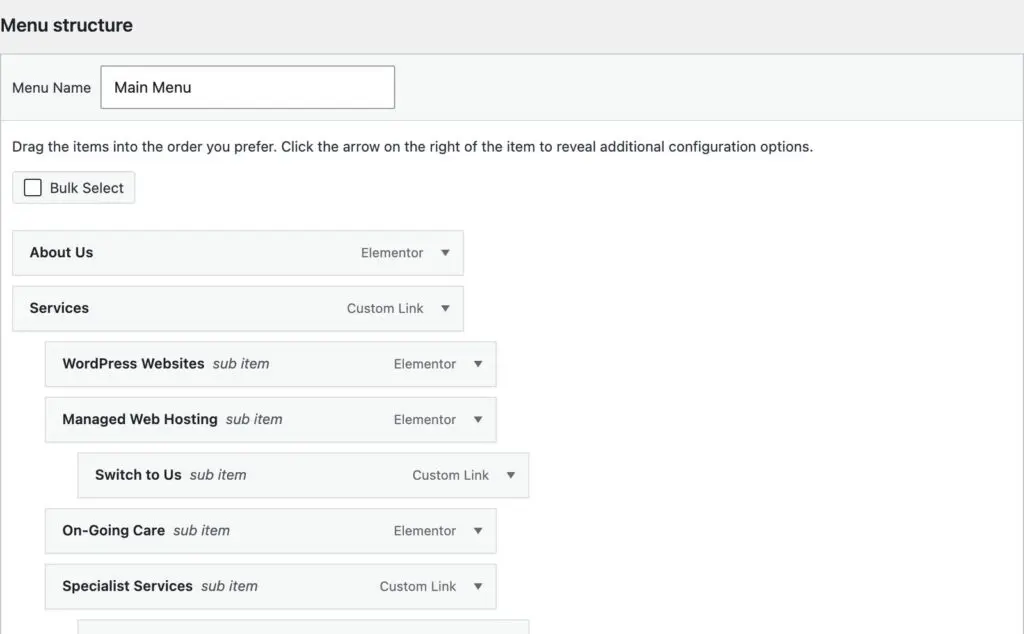
- In your dashboard, go to Appearance, then Menus.
- Pick the menu from the dropdown at the top, usually called Main or Primary.
- To add a page, tick it in the Pages box on the left and click Add to Menu. For a link to another website, use Custom Links.
- Drag items to reorder them. Drag one slightly to the right to put it under another as a dropdown.
- To remove one, click its arrow and choose Remove.
- Click Save Menu.
The footer
Footers are built in a few different ways:
- Elementor: go to Templates, then Theme Builder, open Footer and edit it like a page. Footer links are often a list you click and edit directly rather than a menu.
- Divi: go to Divi, then Theme Builder, and edit the global footer.
- Otherwise: check Appearance, then Menus, for a menu called Footer.
Before you finish
Check the menu on your phone too, as the mobile menu can show items differently. Not sure which of these your site uses? Send us a support request and we’ll point you to the right place.