
Deleting a page is easy. The catch is that people may still find it through Google, bookmarks or old emails, and they’ll land on a page not found error. A redirect fixes that.
1. Decide where visitors should go
Pick the page that best replaces it. For an old booking page, that’s the new booking page. For a closed branch, it might be your contact or locations page.
2. Set up the redirect
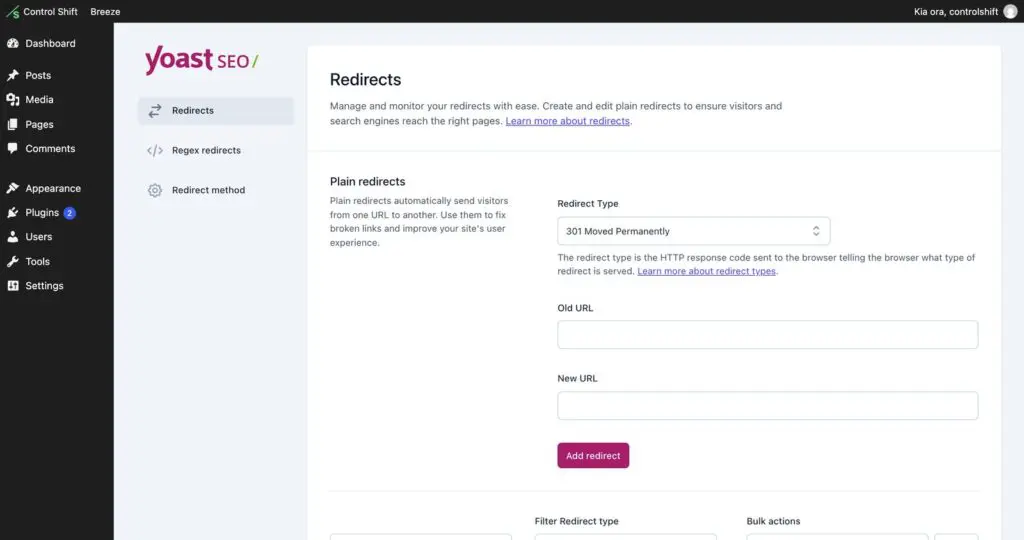
If your site has Yoast SEO Premium, go to Yoast SEO, then Redirects. Enter the old address (just the part after your domain, like /old-booking-page/), the new address, keep the type as 301 Moved Permanently, and click Add Redirect. Yoast Premium also offers to make one for you when you delete a page or change its slug.
No redirect tool on your site? Send us a support request with the old and new addresses, and we’ll set it up.
3. Take the page down
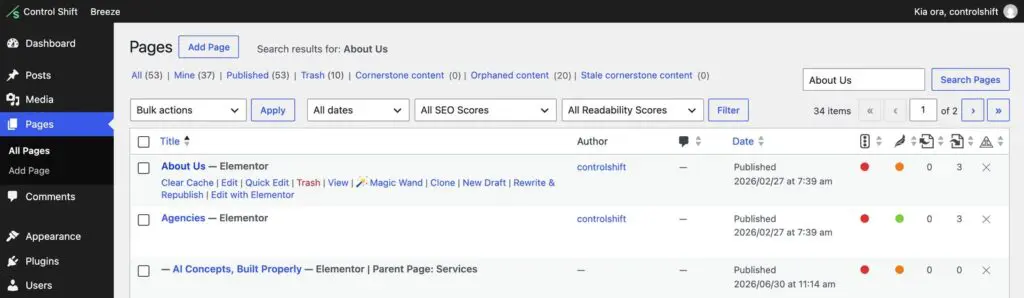
Go to Pages, hover over the page and click Trash. If you might want it back, open it and change its status to Draft instead.
4. Check
- Remove the page from your menu and footer if it was there.
- Type the old address into your browser and check you end up on the new page.